v2.8.6 is the current stable release. It only rewords this guide; the
plugin's behaviour is unchanged from v2.8.5, which made every imported PDF
end up with a parent registry item, even when Zotero's recognizer can't identify it. It
builds on the v2.8.4 redesigned Settings pane, the v2.8.3 no-orphaned-records
delete, the v2.8.2 two-way-delete prompt, the v2.8.1 audit-hardening pass,
the v2.8.0 Check & Repair tool, the v2.7 whole-library mirror default and
the v2.6.x data-safety wave.
The bar to ship was: 965 unit tests passing across 28 files,
live-Zotero MCP validation on Zotero 9.0.4, and no known data-loss path.
-
Done
v2.8.5: no orphan imports + metadata fallback
Every imported PDF now gets a parent registry item, never a bare standalone attachment. When Zotero's online recognizer can't identify a file, the plugin attaches a parent anyway: a conservative page-1 DOI / arXiv / ISBN lookup (page 1 only, so a cited reference's DOI can't be mistaken for the document's own), and otherwise a clean filename-titled parent (separators tidied, Title Case, acronyms kept, id-junk stripped). A startup and on-demand backfill sweeps standalone PDFs the plugin imported earlier. Gated by the new metadataFallback preference (on by default). Additive only: it creates parents, never deletes.
-
Done
v2.8.4 — redesigned Settings pane
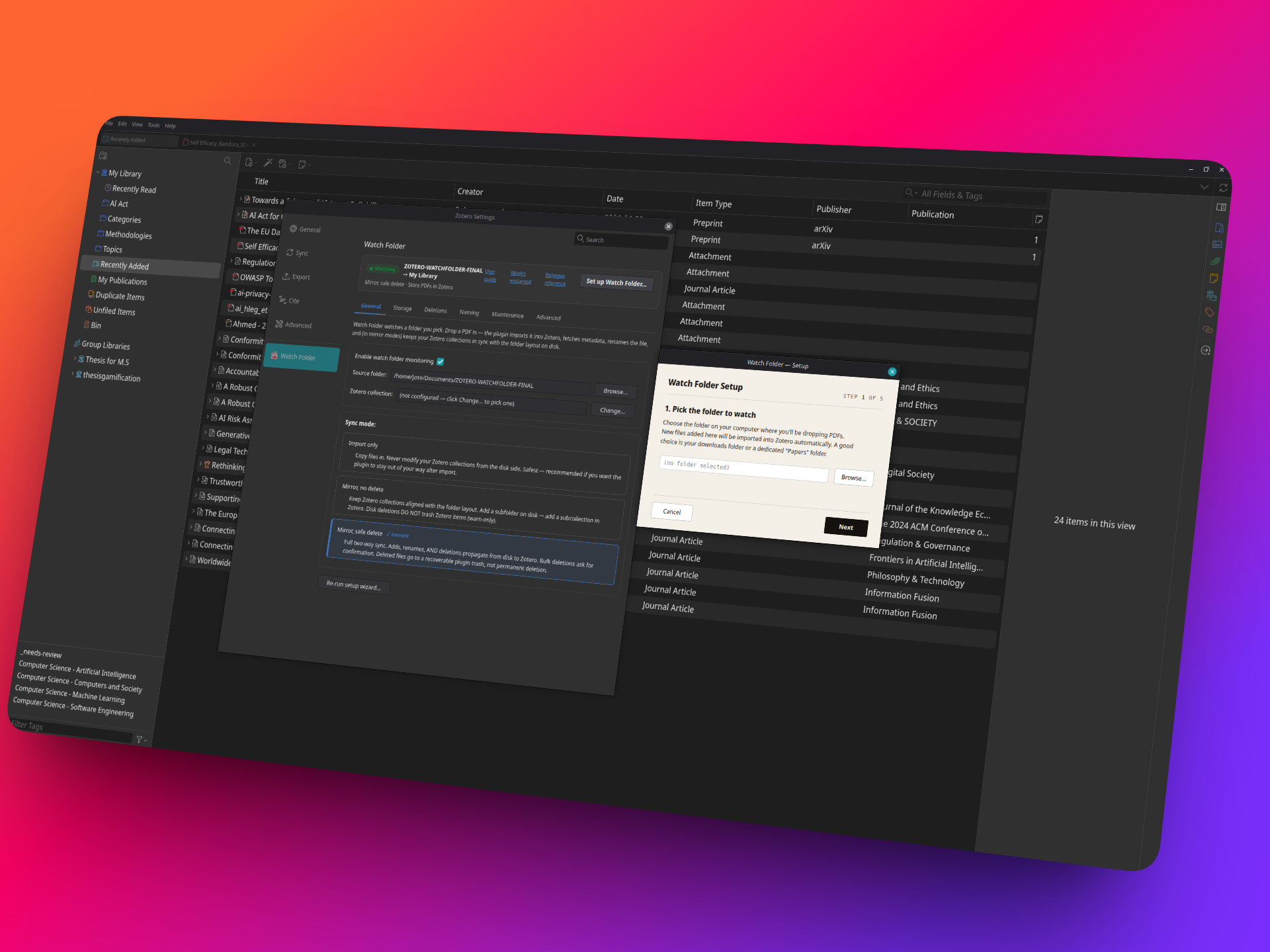
The preferences pane is rebuilt around a persistent status header — watching/paused state, folder → destination, sync mode · storage strategy, and an attention strip for anything that needs review — plus a six-tab layout (General, Storage, Deletions, Naming, Maintenance, Advanced) that replaces the old single long scroll. Theme-adaptive styling for Zotero's light and dark Settings. A pure UI/structure change: no behavior, preference, or delete-logic changes.
-
Done
v2.8.3 — no orphaned records on delete
When you remove a PDF from the watch folder, the deletion now targets the whole bibliographic entry, not just the attachment — so deleting the file no longer leaves a childless "ghost" record behind in your library. If the parent item still has other attachments or notes, only the one attachment is removed; the rest is preserved. Applies to Move to Trash and Delete Permanently alike.
-
Done
v2.8.2 — two-way delete prompt
Mode 3 disk→Zotero deletion is now a real confirmation: when files disappear from the watch folder, the plugin asks before touching your library — Move to Trash (recoverable Bin), Keep in Zotero, or Delete Permanently — with an "always do this" checkbox that becomes your standing default (settable in Settings via the new diskDeleteSync control). Default is Ask; fail-safe is Keep when no UI is available. "Delete Permanently" is honored per batch but never saved as a silent standing policy. This complements the existing Zotero→disk control (diskDeleteOnTrash) for full, confirmed two-way delete.
-
Done
v2.8.1 — audit hardening
Two adversarial multi-agent audits plus live-Zotero verification closed three data-safety bugs (remove ALL tracking records for an attachment so a shadow copy can't orphan; a reconcile rehome TOCTOU; the per-file delete gates now hash directly instead of trusting the path/size/mtime cache, closing a fail-open on mtime-preserving edits) and added error-handling robustness (the async metadata callback is now awaited so its failures surface; bootstrap, preference-pane registration, and the poll loop are guarded so a throw can't silently wedge startup or kill the scan loop). No behavior changes — pure correctness + resilience.
-
Done
v2.8.0 — Check & Repair
A Settings tool that scans for inconsistencies between your watch folder, Zotero, and the plugin's tracking (shadow-orphaned files, stale dead-state records blocking a folder rename, orphan tracking entries). Each issue is presented with a plain-English explanation and a recommended fix; applies only what you approve, and re-validates at apply time. Items with annotations or notes are surfaced first and never deleted. Additive-only: tracking fixes and collection membership — no file deletions, no Zotero bypassing. 965 unit tests across 28 files.
-
Done
v2.0 — Mode 1 (import only)
Sync-root scoping, identity by attachment key, full-file SHA-256, prefs picker.
-
Done
v2.1 — Mode 2 (mirror without delete)
Event pipeline (collection / item / disk), per-key locks, conflict gate, first-run baseline, warning sink, suppression resolver.
-
Done
v2.2 — Mode 3 (mirror with safe delete)
Cascading-trash guard, plugin trash dir, restore matrix RST.1–RST.6, bulk-delete confirm, runtime enabled observer, smart-rules JSON editor.
-
Next
MODE2.md live runbook pass
BASE/ADOPT/LATE/REN/MEM/SUPP/CONF scenarios on a live Zotero against the post-v2.2 bundle. Lower priority than MODE3.
-
Next
C1 full setup wizard
Multi-step pane: pick watch folder → pick sync root → pick mode → confirm. Quality-of-life; current single-picker setup works.
-
Done
RecognizePDF reparenting fix (2026-05-25)
The "DEL.2 shadow lifecycle quirk" turned out to be a wider bug: every freshly-imported file ended up suppressed after metadata recognition. Reparenting guard in itemMembershipHandler._handleRemove + auto-clear in mirrorExecutor._addItemMembership. 7 new unit tests.
-
Done
Parent-trash propagation fix (2026-05-25)
Trashing a parent item in Zotero fires only one notifier event (for the parent); child attachments inherit the deleted state but never get their own event. _handleZoteroTrash now expands non-attachment items to their child attachments via getAttachments(true), so parent-level trashes correctly propagate to disk in Mode 3. UT-090 extended.
-
Done
Setup wizard covers all 3 modes (2026-05-25)
The pre-shipped setup wizard only offered Mode 1 / Mode 2 (Mode 3 was added later). Mode 3 now appears in the picker; each mode shows a tailored safety description and the confirm step surfaces a mode-specific safety note (recoverable trash path, bulk-confirm threshold for Mode 3).
-
Next
Broader live-MCP Mode 3 coverage
DEL.3 / RST.2 / RST.4 / RST.5 / FDEL.2 (10+ PDFs, multi-attachment parents). Unit-tested today, not yet live-pass'd.
-
Done
v2.7.0 — whole-library mirror (new default scope)
Whole-library mirror as the new default (scopeMode: library): root drop → Unfiled, every top-level collection → top-level folder, nested collections map to nested folders. Library-scale delete-safety nets: cloud-eviction pause (deletion halts if >50% of top-level folders vanish in one cycle), per-cycle mass-deletion cap, one-time "enable library-scale deletion" confirmation before the first delete. Existing installs are automatically pinned to their current collection-scope behavior on upgrade — opt in via re-running setup. 872 unit tests across 26 files.
-
Done
v2.6.4 — storage tools, missing-files panel, date token + a rename fix
From a multi-agent review of live testing feedback: a storage report (items / stored vs linked / bytes / how much your Zotero trash is holding), an Empty Zotero trash button to reclaim that space (permanent, library-wide, behind a Cancel-default confirm), a "Files removed from disk" panel to forget tracking entries for deleted files, and a {date} filename token (publication date, dd.mm.yyyy). Plus a data-safety fix: renaming an empty folder no longer trashes-and-recreates its Zotero collection when an old suppressed record lingers. The "7 files → 4 imported" dedup and "one item, all copies on disk" behaviors are working as designed — content-hash dedup + shadow records.
-
Done
v2.6.3 — launch-readiness: data-safety fixes + settings UX + docs
Data-safety hardening from a deploy-readiness audit: a transient drive/cloud drop can no longer mass-trash collections (folder-deletion pass gated behind a watch-root-availability check), the Zotero→local delete gate now fails closed, Windows-reserved collection names are sanitized before mirroring, and a "Delete permanently" choice is never persisted as a standing default. Plus the settings UX (clickable mode/storage cards with a "✓ current" badge, a "★ Best for WebDAV / cloud sync" badge + hint), readability fixes, and a revamped README + public docs/ folder (DEVELOPERS.md + visual architecture.md).
-
Done
v2.6.1 — fail-closed "Reclaim Zotero Storage" safety fix
The stored→linked conversion now keeps a PDF stored unless it can positively prove zero annotations and zero notes — a missing or erroring annotation API is treated as "uncertain → keep stored", never as "safe to convert". Protects PDF-reader highlights from being orphaned.
-
Done
v2.6.0 — deletion-safety hardening + PDF storage strategy
Conflict gates on every Mode 2/3 delete path (local-hash + Zotero-side freshness), Mode 2 suppress-not-drop (no re-import loop), adopt-into-scope after baseline, split local-folder / Zotero-collection delete directions; user-friendly README + technical DEVELOPERS.md; and a PDF storage-strategy layer — store in Zotero / link from watch folder / store + mirror — with "Reclaim Zotero Storage" and "Build/Repair Mirror" tools.
-
Done
v2.3 / v2.4 — stable line + setup wizard
Trashed sync-root hardening, full multi-step XHTML setup wizard, security audit close-out.
-
Done
v2.5.0 — performance pass + UX polish
Module-level hash cache, debounced save, parallel _moveFolder child rewrites, notifier debounce + coalescing, prefs-pane redesign (live mode picker, bundled offline docs, advanced disclosure, Smart Rules in a separate window), perf telemetry hook.
-
Future
Cross-library / group library sync
Forward-compat: syncRootLibraryID pref is already in place.
-
Future
Smart rules — form editor
Replace the JSON textarea with a guided form. Engine is already there.